How to share your music taste with friends

Dropping links in the group chat has a low hit rate, because a link asks someone to stop what they are doing and go listen to a four-minute song on your recommendation. Passive sharing works better. Give friends a profile they can browse when they feel like it, a feed showing what you are actually playing, and a one-tap way to react. Soundbooth builds all three from your Apple Music or Spotify history, so sharing becomes a side effect of listening rather than a task you have to remember.
Share your music taste with friends, step by step
- Set up a profile worth visiting. Pick a handle, add a photo and a one-line bio. Your profile shows total listens, followers, following, and your listen history grouped by date, so it reads as a running record rather than a static top-ten list.
- Connect the service you already pay for. Apple Music connects through MusicKit, Spotify through OAuth. The app reads your play history to fill the profile. It does not post, change playlists, or touch anything in your streaming account.
- Invite the two or three friends who already send you music. They are the ones who will check the feed. Send them your profile link. Four or five people is enough for a feed that stays interesting.
- React instead of recommending. A fire or heart emoji on a friend’s listen takes one tap and starts more conversations than a link does. Reactions appear under the track for everyone following that friend.
- Use the weekly summary as a prompt. Plays, songs and reactions for the group, plus a trending track and a most-active ranking, give the group chat something concrete to argue about every week.
Why link-dropping fails and passive sharing works
A recommendation is a request. It carries an implied obligation to listen, form an opinion, and report back, which is why so many of them sit unopened. A feed carries no obligation at all. Your friend scrolls it at a bus stop, sees a track name they half recognise, taps it, and now they have discovered something without either of you doing any work.
The other advantage is honesty. A curated playlist is what you want people to think you listen to. A listening history is what you actually played, including the song you had on repeat for two days and would never have recommended. That second thing is far more interesting to the people who know you.
Reactions as the shared language
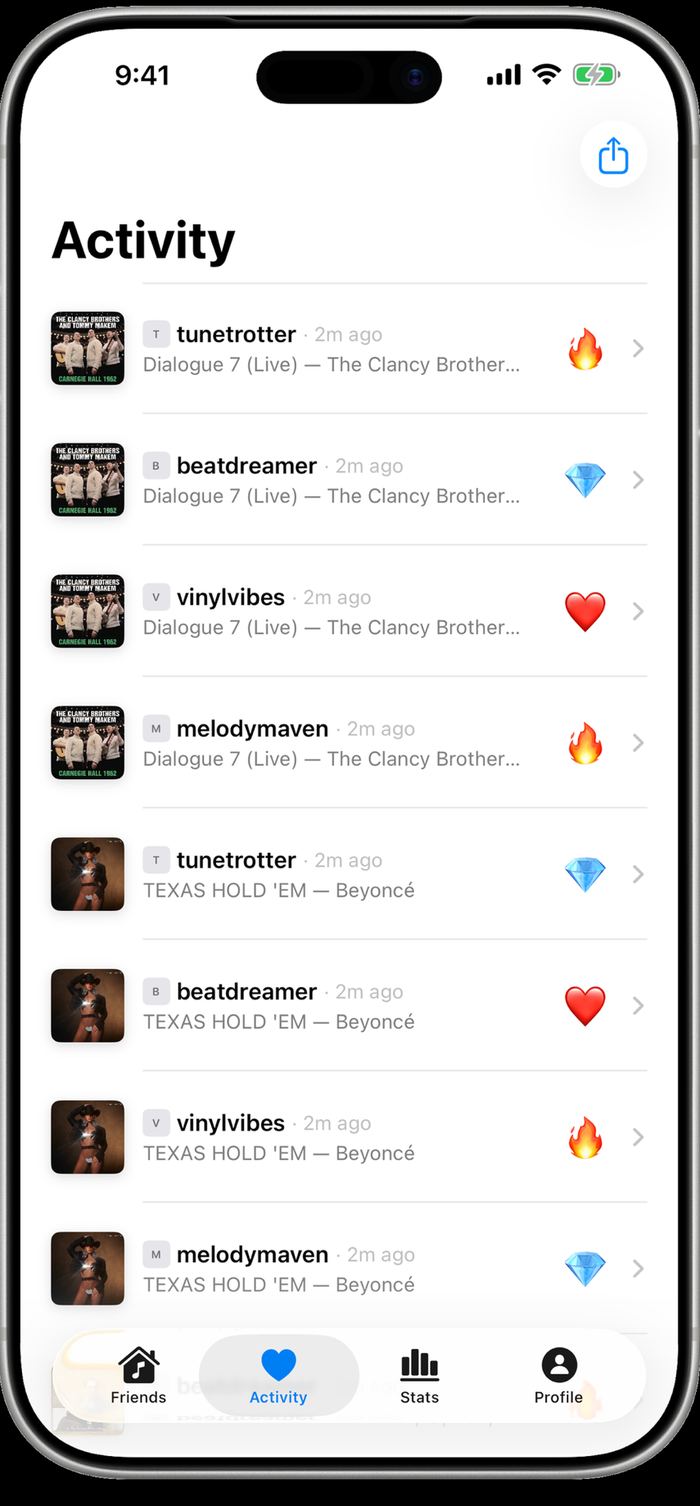
Soundbooth’s Activity tab is a running list of reactions across your circle: who reacted, to which track, with which emoji, and how long ago. Four friends reacting to the same live recording within a couple of minutes reads as a small moment, and it happens without anyone typing a message.
Because reactions attach to a specific listen rather than to a person, they also serve as a lightweight bookmark. Scrolling back through what you reacted to is a decent way to rebuild a playlist of things you liked but forgot to save.
Giving friends something to dig into
Taste is easier to share when there is detail to talk about. Tapping any listen opens the track page with metadata pulled from Apple Music: the full songwriter and producer credits, duration, track number, release date, and genre tags. An album art carousel lets you swipe through the different editions a song has appeared on, from original single to deluxe reissue.
That layer turns a shared listen into a conversation with somewhere to go. Discovering that a country single you both liked has seven credited writers is the kind of detail that generates a reply, which is more than most shared links manage.
Streaks, rankings and friendly competition
Numbers give a group something to compete over. Soundbooth tracks a daily listening streak with a personal best, ranks your top artists and tracks by play count, and puts a most-active row at the top of the Friends tab showing who logged the most listens this week.
Used lightly this is fun. Used heavily it becomes the reason people open the app, which is worth knowing before you start optimising your streak at 11:50pm. The weekly trending card is the healthier version: it tells the group which track the most of you played, and that usually starts a better argument than a leaderboard does.
Questions
Can I share my music taste without everyone seeing everything I play?
Your listens are visible to people who follow you, and you approve followers. For anything you would rather keep off the record, a private session in Spotify or Apple Music keeps those plays out of the history entirely.
What if my friends use different streaming services?
They still appear in the same feed. Soundbooth reads history from both Apple Music and Spotify, so a mixed friend group sits in one list instead of two apps.