How to see your Apple Music listening stats
Apple Music Replay is the official answer, and it lives at replay.music.apple.com rather than inside the Music app. Sign in with the Apple Account tied to your subscription and you get top songs, artists and albums, refreshed roughly weekly rather than once every December. What Replay does not give you is a daily view, a streak, or any comparison against your friends. For that you connect Apple Music to a stats app such as Soundbooth, which reads your listening history and keeps a running picture you can open any morning.
Find your Apple Music listening stats, step by step
- Open Replay in a browser. Go to replay.music.apple.com and sign in with the Apple Account you use for Apple Music. Replay is a web experience, so there is no button for it inside the Music app on iPhone.
- Check the eligibility threshold. Replay needs enough listening in the current year before it generates anything. New subscribers and light listeners often see an empty state until they cross that bar.
- Turn on Listening History. In Settings, Music, confirm Use Listening History is on. With it off, Apple records nothing, Replay stays empty, and no third-party stats app can see anything either.
- Connect Apple Music to a stats app. Soundbooth authorises through MusicKit. It reads your play history to build charts and a streak, and it does not alter your library, playlists, or playback.
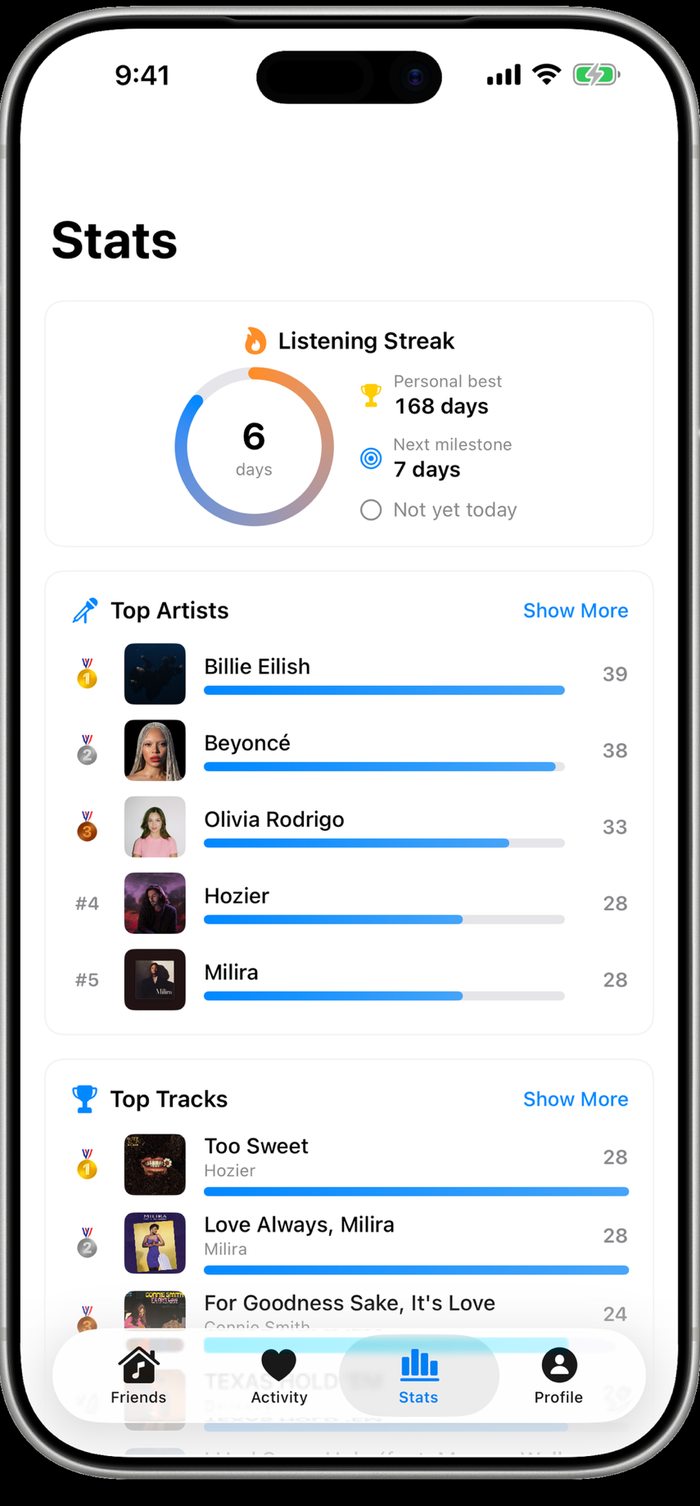
- Check the Stats tab. Top artists and top tracks appear as ranked bars with play counts, alongside a streak ring showing current days, personal best, and the next milestone.
Why Apple Music feels like it has no stats
Spotify Wrapped trained everyone to expect an annual summary, and Apple built Replay as its counterpart. The difference is placement. Wrapped arrives inside the app with a push notification and a shareable card. Replay is a URL, which means most subscribers never see it, and the ones who find it in December assume it only exists in December. It actually updates through the year.
The deeper gap is granularity. Replay answers "what did my year look like" in year-sized units: top 100 songs, top artists, total minutes. It cannot tell you whether you listened yesterday, what your best month was, or how this week compares with last. Those are the questions people are usually asking when they search for Apple Music stats.
Daily stats, streaks and top-artist rankings
Soundbooth’s Stats tab opens on a listening streak ring: current run in days, your personal best, and the next milestone you are heading for. If you have not logged a listen yet today, it says so, which is a mild but effective nudge.
Under that, Top Artists lists your most-played artists with a bar for each and the raw play count on the right, medals on the top three. Top Tracks does the same for individual songs with the artist under each title. Because the numbers are play counts rather than minutes, a three-minute single and a nine-minute album track are weighted the way you actually experienced them: one listen each.
What listening history does and does not include
Play history covers what you play through the connected service. Tracks you listen to on a different account, on a friend’s speaker, or on vinyl are invisible to any stats tool, because the only signal available is what the streaming service recorded. Private sessions are excluded by design.
Listens sync on a periodic schedule rather than the moment a song ends, so a track you started five minutes ago may not appear yet. That is normal for anything built on streaming history rather than on-device playback monitoring, and it is why a stats screen showing yesterday in full is more trustworthy than one claiming to be live to the second.
Making the numbers mean something
Stats get more interesting when they are shared. A personal best of 168 consecutive days is a fact about you; the same number next to the streaks of five friends becomes a small ongoing competition. Soundbooth pairs the Stats tab with a Friends feed and a weekly group summary for exactly that reason.
The other use is retrospective. Peak listening hours tell you when music actually fits into your day, and watching an artist climb the ranked bars over a few months is a clearer record of taste drift than trying to remember what you were into last spring.
Questions
Does Apple Music Replay update all year or only in December?
All year. Replay refreshes roughly weekly at replay.music.apple.com, so you can check your running top songs and artists in March. December is just when Apple promotes it.
Why is my Apple Music Replay empty?
Two usual causes: you have not listened enough this year to hit Apple’s eligibility threshold, or Use Listening History is switched off in Settings, Music. With that setting off nothing gets recorded at all.