How to see what your friends are listening to

Both big streaming services have a version of this feature, and both stop at their own border. Spotify shows a Friend Activity panel, historically desktop-only and limited to people you follow who have left the setting on. Apple Music has a Listening To section on your profile that only surfaces other Apple Music subscribers. If your group chat is split across the two, neither one shows you the whole room. A cross-platform app like Soundbooth sits on top of both, reads your recent listening history after you connect an account, and puts everyone in a single feed.
See what your friends are listening to across Spotify and Apple Music, step by step
- Check the built-in feature first. On Spotify, open the desktop app and turn on Friend Activity in settings. On iPhone, open Music, tap your profile picture, and set up a public profile so friends can follow you. Both work fine when everyone you care about uses the same service.
- Connect your streaming account to Soundbooth. Sign in with Apple, then authorise Apple Music through MusicKit or Spotify through its standard OAuth screen. The app reads your listening history so it can build your feed. It does not post to your account, change your playlists, or control playback.
- Follow your friends. Search for usernames from the Friends tab. Following is per person, not per service, so a Spotify listener and an Apple Music listener land in the same list.
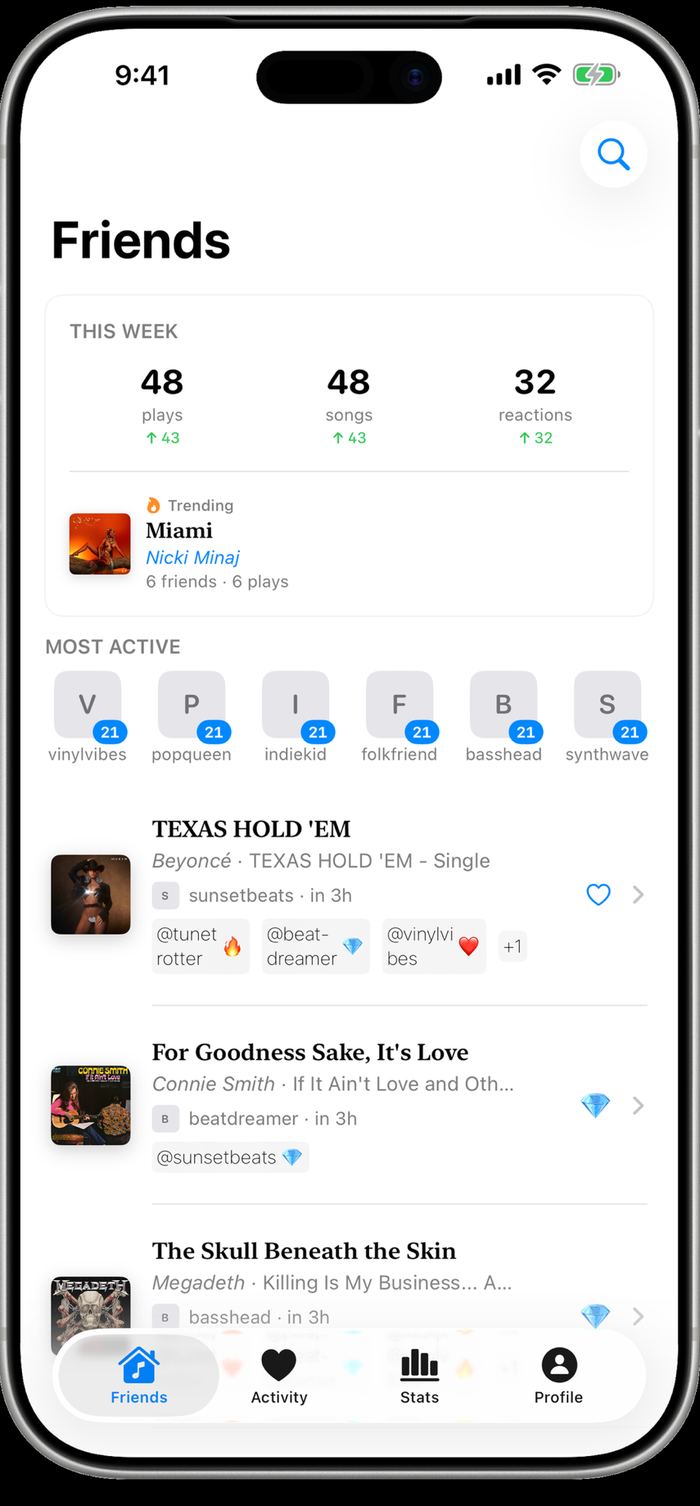
- Read the Friends feed. The feed lists each listen as a card: track title, artist, album, which friend played it, and how long ago. Listens sync periodically rather than the instant a song starts, so expect a short lag behind the actual play.
- React to the ones worth reacting to. Tap the emoji on a card. The reaction shows up under the track for everyone following that friend, and the friend gets a notification.
Why the built-in features leave gaps
Spotify Friend Activity is a sidebar on the desktop client. It shows the last track from people you follow, and only from those who have the sharing setting enabled, which is off by default for private sessions. If you mostly listen on your phone, you rarely see it at all.
Apple Music does better on mobile but ties everything to an Apple Music profile. You follow people, they approve you, and the Listening To shelf on your profile fills with their recent plays. Someone on Spotify simply cannot appear there. That constraint is the whole reason cross-platform apps exist: most friend groups are mixed, and neither company has an incentive to show you the other side.
What a cross-service feed looks like in practice
Soundbooth puts every friend in one chronological list regardless of where the play came from. Each row carries the album art, the track title, the artist, the album it came from, the friend who played it, and a relative timestamp. Reactions your friends already left sit under the row as small chips with their usernames.
Above the feed there is a weekly summary: plays, distinct songs, and reactions for the group, with the week-over-week change next to each number. A Trending card sits under that, naming the track the most friends played that week and how many plays it took. Below the summary, a Most Active row ranks friends by listens for the week.
Privacy and what connecting an account actually does
Authorising Apple Music or Spotify grants read access to your listening history. Soundbooth uses that to build your feed, your stats, and your streak. Your streaming account is not modified: no playlists get created, no tracks get added to your library, nothing gets posted anywhere on your behalf.
Who sees your listens is controlled by who follows you, and following is something you approve. Soundbooth does not sell listening history and does not run ads. If you want to go quiet for an evening, the reliable move is the same one that works everywhere else: use your streaming app’s private session, and nothing from that session enters the feed.
Getting your friends onto the same feed
The awkward part of any social music app is that it needs at least a few people. The practical approach is to start with the two or three friends who already send you links unprompted, since they are the ones who will actually check the feed. Share your profile link, have them connect whichever service they already pay for, and the feed becomes useful at around four or five people.
One thing that helps more than it sounds like it should: reactions. A feed nobody responds to goes stale. A feed where someone drops a fire emoji on your 2am listen turns into an ongoing conversation, which is roughly the point.
Questions
Can I see Spotify friend activity on my iPhone?
Not in the Spotify app itself. Friend Activity has been a desktop feature, so phone users need either the desktop client or a third-party app that reads listening history from both services and shows it on mobile.
Do my friends have to use the same streaming service as me?
No. That is the specific gap Soundbooth fills. An Apple Music listener and a Spotify listener appear side by side in the same feed once both have connected their accounts.