A wishlist app that works across multiple stores

A wishlist that spans stores has to do three things a retailer’s own wishlist cannot. It has to accept items from any site, including the small shop that has no account system. It has to keep the price you saw beside the price today. And it has to stay readable once it passes thirty items, which means brands, tags and sorting rather than a wall of thumbnails. Most people already keep a cross-store list; it is just scattered across browser tabs, camera-roll screenshots and a note on their phone.
Why per-retailer wishlists fall apart
Every store wants its wishlist to be the one you use, because a saved item is a marketing permission. So each list lives behind its own login, shows only that store’s catalogue, and quietly becomes an email trigger. Six months in you have eight half-remembered wishlists and no idea which account holds the jacket.
The gaps are worse than the duplication. Plenty of independent shops running on Shopify or Squarespace have no wishlist feature at all, and neither does Instagram’s shop tab in any form you can search later. So the shopper compromises: a screenshot here, a tab left open there, a link texted to themselves. That improvised list is the real wishlist, and it is unsearchable and priceless in the bad sense, because none of it records what anything cost.
What a cross-store list has to get right
One entrance. If saving takes more than two taps from wherever you found the thing, the list will not get used. The iOS share sheet solves this for every app that can share a link, and a paste-a-URL screen covers the rest.
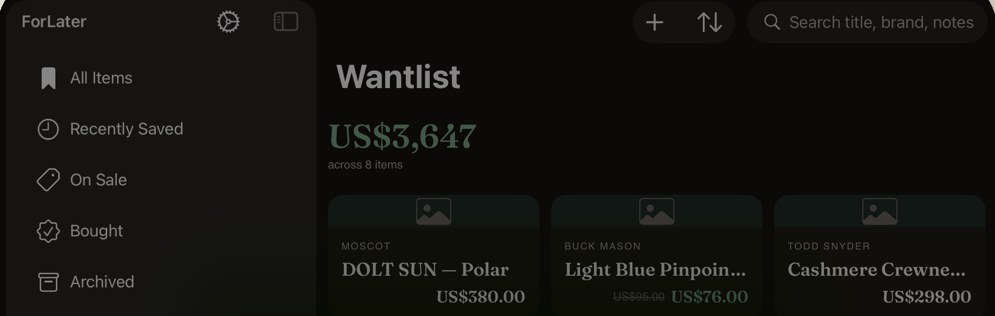
Structure that survives volume. A flat grid works at ten items and collapses at fifty. What holds up is a set of views that answer real questions: what did I save recently, what has dropped in price, what did I already buy, and what have I given up on. ForLater’s sidebar does this with All Items, Recently Saved, On Sale, Bought and Archived, plus your own tags underneath. The brand sits above each product title, so a mixed list of eyewear, knitwear, shoes and luggage stays scannable without opening anything.
The saved price has to travel with the item. A store’s own wishlist shows today’s number and nothing else, which makes every markdown look like news. A cross-store list that recorded $95 in March and shows $76 today is doing the one job the retailer will never do for you. The same applies to availability: an item that has sold out should say so on the card rather than waiting for you to tap through and find out.
Keeping a mixed list readable past thirty items
Tag by intent, not by store. "Apartment", "Winter", "Gifts" and "Someday" tell you something when you open the list in three months; "Todd Snyder" does not, because the brand is already printed on the card. Two or three tags per item is the point where the system helps and the point where it becomes admin.
Archive instead of deleting. An archived item keeps its saved price, so when the same coat reappears next autumn you know whether $298 is the usual number. And glance at the running total now and then. Eight saved items adding up to $3,647 is a genuinely useful sentence about your near future, and no single product page will ever tell you it.
Sync matters more than it sounds. Saving on the phone from Instagram at night and opening the same list on a Mac the next morning is the normal shape of a considered purchase. In ForLater that list travels through your private iCloud database, so the items are on your devices rather than on somebody’s server.
Questions
Can a cross-store wishlist tell me what everything would cost together?
ForLater totals the current price of everything in view and shows it above the grid, so a list of eight items reads as one number. Filtering to a tag such as "Apartment" totals just that subset, which is the version most people want before a big month.
Does it work for small independent shops as well as big retailers?
Yes. Saving works from any product URL, so a one-person ceramics shop is handled the same way as a department store. Price capture depends on how the page publishes its price, and you can always edit an item by hand if a page is unusual.