How to track price drops on things you want

Save the item on the day you find it, keep the price you saw stored next to it, and re-check that one list on a schedule. Price tracking works when the list is short and personal. A service that pings you about every markdown on a retailer’s site trains you to ignore it inside a week, and the items you genuinely wanted get buried under the ones an algorithm picked. ForLater keeps the watching quiet: each saved card holds the price at save time, a refresh pulls the current price, and anything that fell shows up with the old price struck through.
Track a price drop on something you want, step by step
- Save it at the price you found it. Use the iOS share sheet from Safari or paste the link into the app so the title, brand, image and current price are captured together. That saved price is your baseline. Without it, a later "sale" banner is unverifiable.
- Write down what you would actually pay. One line in the notes field: "worth it at 140" or "only if it goes under a hundred". Deciding your number while you are calm is what stops a 15% markdown from feeling like a reason to buy.
- Refresh on your own schedule. Tap Refresh now on a single item, or use Refresh All in ForLater Plus to update every saved item at once. You choose when to look rather than being interrupted.
- Read the On Sale list, not the whole list. After a refresh, the On Sale smart list collects only the items whose price moved down. On a list of thirty saves, that is usually two or three cards, which takes ten seconds to review.
- Close the loop. Mark the item as bought when you buy it, or archive it when the want has passed. A tracker only stays useful if things leave it.
Why deal alerts stop working after a week
Retailer newsletters and browser deal panels are built to maximise the number of discounts they can show you. That is the opposite of what a shopper needs. The signal you want is narrow: this specific pair of shoes, in your size, cheaper than the $175 you saw in March. What you get instead is a stream of 20% off everything, which is either a permanent condition or a manufactured one, and either way it is noise.
The predictable result is alert fatigue. You mute the notifications, stop opening the emails, and go back to the real system most people use, which is checking a browser tab every few days until you forget the tab exists. Tracking only survives if the number of things it can interrupt you about is small and chosen by you.
The saved price is the whole trick
A discount claim means nothing on its own. A store can raise a price in September and stage a sale in November, and the badge on the product page will still read like good news. The only cheap defence is your own record: what the thing cost the first time you looked at it.
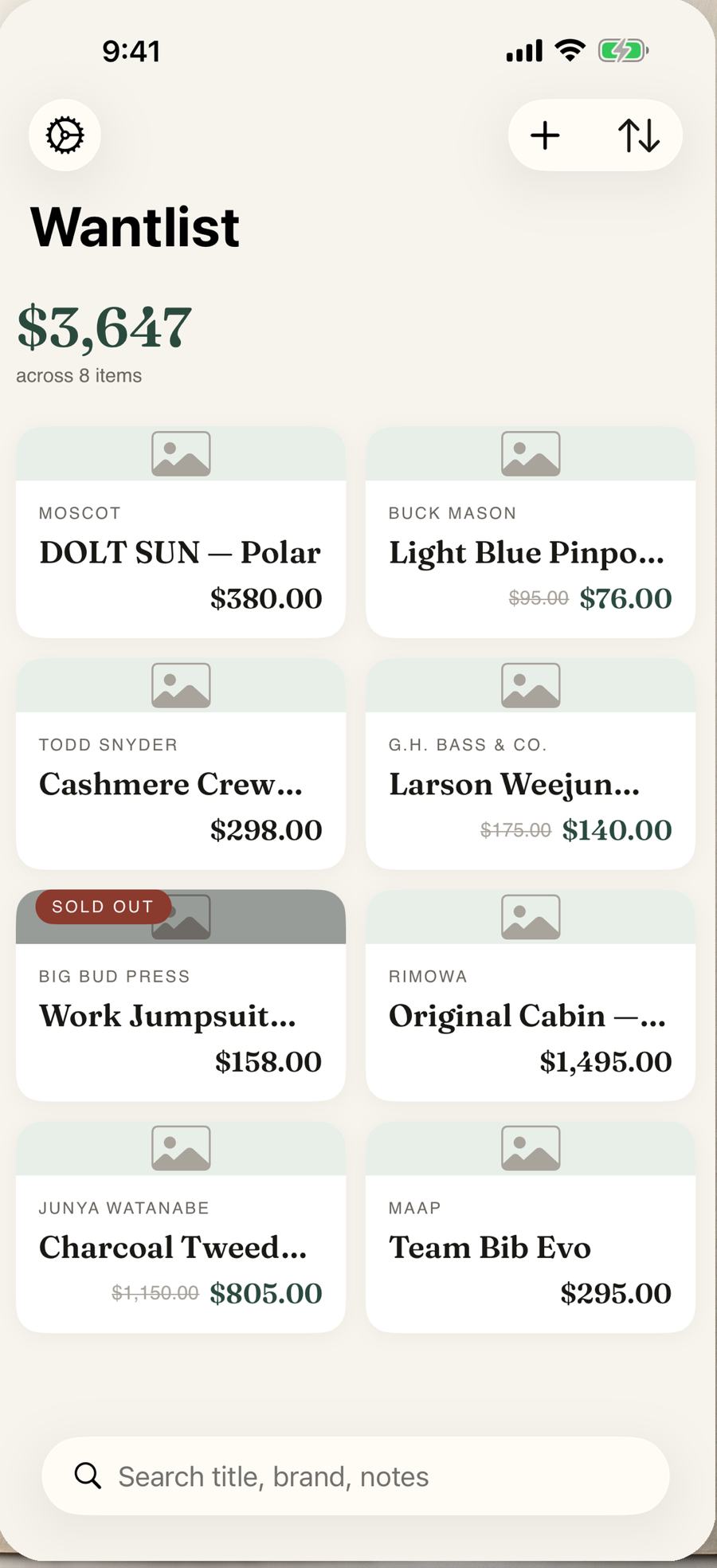
This is why saving early matters more than refreshing often. In the wantlist below, the Buck Mason shirt shows $95.00 struck through next to $76.00, and the G.H. Bass loafers show $175.00 struck through next to $140.00. Those old numbers are not from a price-history database, they are simply what the app recorded when the item was saved. Items that sell out get a badge too, which is the other half of the picture: knowing something is gone is worth as much as knowing it is cheaper.
A refresh rhythm that fits how sales actually happen
Most retail markdowns are seasonal rather than random. Clothing and footwear go down in late January, again in late June or July, and hardest in the week after Thanksgiving. Furniture follows new-collection cycles in spring and autumn. Luggage and outdoor gear tend to move at the end of summer. A weekly refresh through the year plus a daily one during those windows catches nearly everything without turning shopping into a job.
Refresh All exists for exactly this. One tap updates every saved item, and you read the difference rather than the whole list. If your list is under ten items, the free tier handles this without any subscription; Plus removes the item limit and adds the one-tap refresh across everything.
Questions
Do I need price history charts to know whether a discount is real?
Charts help on Amazon, where prices move daily and third-party history databases exist. For most clothing, furniture and independent shops there is no public history at all. The price you personally recorded when you saved the item is a more honest reference point than a store badge.
What happens if something sells out while I am waiting?
The card gets a Sold Out marker on the next refresh, so it stops sitting in your list pretending to be available. Many items come back after a restock, which is worth knowing before you pay resale prices for one.